Getting Started in Pave the Road
Day-one checklist from first roller to your first saved upgrades.
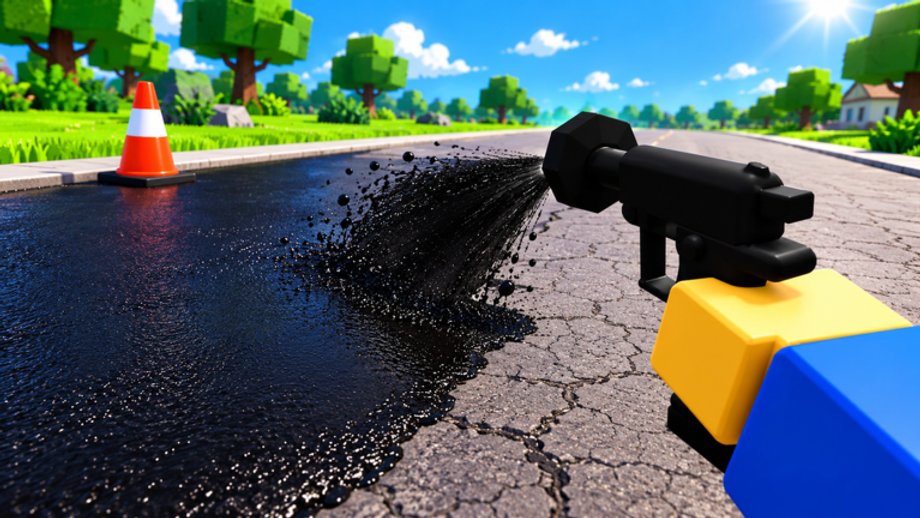
Pave the Road is a Roblox simulation / incremental simulator from the verified group Seal the Road. You fill potholes, seal asphalt with rollers that grow into giant machines, team with up to 19 other players (20 max), unlock powers and badges, and—critically—keep your progress between sessions. This getting-started guide is the day-one path from clicking Play to a stable paving loop.
Place link: Pave the Road on Roblox (UniverseId 10766345722). Stats context: 14M+ visits, 160k+ favorites, roughly 79% rating, with concurrency often between about 1.5k and 4.7k—you should find active towns quickly.
Before you spawn
- Like and favourite the experience so you notice description updates (codes and jobs often land there).
- Turn on a mic or chat if you want co-op calls; otherwise text is enough.
- On mobile, plan for the Codes button on the right side of the HUD—easy to miss on small screens.
Minute 0–5: join the town and grab a roller
Load in and orient to the unfinished streets. Your first tool is effectively a hand roller tier: slow, but enough to learn the pipeline. Pick up or equip the starter roller when the tutorial or world prompt offers it. Do not sprint into the shop yet—seal a few meters so you feel stroke timing.
Goals this segment:
- Confirm movement on PC or touch (Players Hub has control notes).
- Locate a cluster of potholes on a nearby road.
- Notice drums / refill cues even if you cannot unlock better drums yet.
Minute 5–15: fill potholes, then seal
The core fantasy is literal: broken road → filled → sealed.
- Fill potholes along a short block instead of zig-zagging the whole map.
- Follow with squeegee / prep habits if the UI exposes them—community tools mention Auto Squeegee for a reason; manually, one clean pass beats three sloppy ones.
- Roll / seal the prepared strip until the road reads as finished.
- Push / collect related parts or follow-up interactions if your build shows them.
Stay on one avenue until it looks complete. Random teleport tourism wastes the early economy. Deeper routing lives in How to Pave.
Minute 15–25: first upgrades and Dig Stash awareness
When the starter roller feels sticky, open the shop. Buy the first upgrade that shortens seal time, not the flashiest skin. Then locate Dig Stash nodes—these feed materials so you are not sealing on empty. Even a crude stash → pave → return loop beats standing still. Full thresholds are in Dig Stash and Refills; upgrade philosophy is in Upgrades and the Tier List.
Spend lightly on Pave Bombs only if a pothole cluster hard-blocks your route.
Redeem DIGBY immediately
Active code (November 2026): DIGBY → 300 Gems + 2 free spins (case-sensitive). It is the first widely tracked public code.
- Click the Codes button on the right side of the screen.
- Enter
DIGBYexactly. - Hit Redeem and verify Gems/spins increased.
Troubleshooting and future code sources (Roblox description, like/favourite prompts) are on the Codes Hub. Feed those Gems into the roller/machine line and use free spins toward Best Value or Sealer style perks when possible.
Progress saves—play in sessions
Older incremental Roblox games sometimes wiped progress on leave. Pave the Road saves between sessions. After your first upgrades and DIGBY redeem, feel free to leave; your roller tier, currencies, and unlocks should persist. If something looks missing, soft rejoin once before panicking.
Team up without griefing
Full servers are common. Split streets with friends: one Dig Stashes while another fills, then both seal. Call unfinished belts in chat. Avoid resealing finished trophy roads while half the town is still cratered. More etiquette sits on Players.
First-hour checklist
- Joined a populated server
- Equipped starter roller and sealed a short strip
- Cleared one pothole cluster end-to-end
- Found Dig Stash and completed one refill cycle
- Redeemed DIGBY
- Bought one meaningful roller/machine upgrade
- Spent or banked free spins thoughtfully
- Left and rejoined once to confirm save
What to read next
- How to Pave — efficiency and technique.
- Upgrades — hand roller → giant machines.
- Dig Stash and Refills — uptime.
- Events and Crates — DIGBY’S REVENGE and NEW CHAPTER.
- Updates — timeline from the September 13, 2026 launch forward.
- Scripts — only with eyes open to ban risk; not needed for this checklist.
Common day-one mistakes
- Ignoring Codes because the button sits on the right edge.
- Spending all 300 Gems on cosmetics before a roller upgrade.
- Wandering without a stash loop until materials hit zero mid-seal.
- Fighting teammates for the same finished lane.
- Assuming progress will wipe—then not checking a rejoin.
Mindset
Pave the Road rewards calm, repeatable circuits. You are not speedrunning a single boss; you are industrializing a town. Master the starter strip, cash DIGBY, upgrade once, and log off knowing the save held. Tomorrow’s session starts richer—that is the incremental promise Seal the Road shipped.
When banners for DIGBY’S REVENGE or NEW CHAPTER appear, finish this checklist first so event hours go into crates and chapter roads instead of relearning the Codes button.
Frequently Asked Questions
Quick answers to the most common Pave the Road questions.
Does Pave the Road save my progress?
Yes. Progress saves between sessions, including upgrades and currencies after a successful redeem or purchase.
What should I do first as a new player?
Grab your roller, clear a short pothole strip, find Dig Stash, redeem DIGBY, then buy your first meaningful upgrade.
Where is the Codes button?
On the right side of the screen. Open it, type DIGBY in capitals, and press Redeem.
How many players can join one server?
Servers support up to 20 players, which makes shared town completion much faster.
Who made Pave the Road?
It is created by the verified Roblox group Seal the Road and released on September 13, 2026.
Where can I watch a gameplay walkthrough?
This page embeds a real Pave the Road gameplay video mid-article so you can see the paving loop in motion.